Install Second Sender
Connect Second Sender to your HubSpot account and start optimizing your email campaigns in minutes. You'll need to be logged into HubSpot before starting.
Before You Start — What to Expect
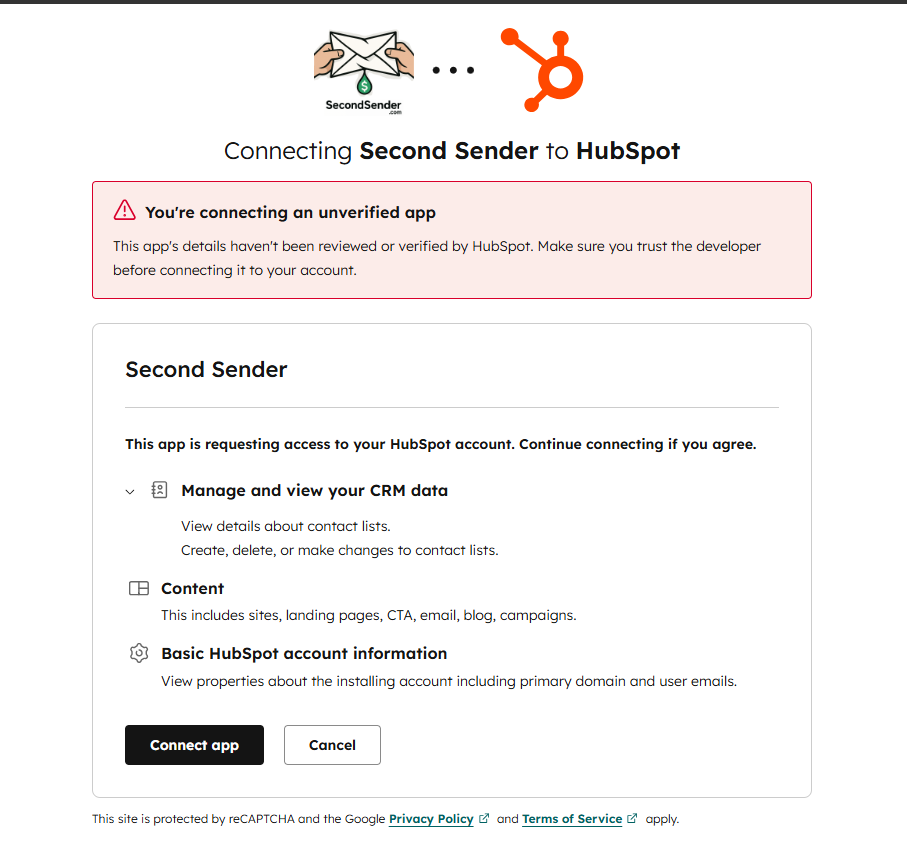
HubSpot requires every app to have at least 3 paying customers before it can be listed in the HubSpot Marketplace. By joining the beta, you’re directly helping Second Sender reach that milestone — and you get free access while we get there. Because we’re not yet listed, HubSpot will show you two warning screens during installation. This is completely normal. Read through what to expect so nothing surprises you.
HubSpot will show the permissions Second Sender is requesting: contact list access, email content access, and basic account info. These are the minimum needed to run optimizations. Click Connect app to approve and continue.
HubSpot is a trademark of HubSpot, Inc. Second Sender is not affiliated with or endorsed by HubSpot.
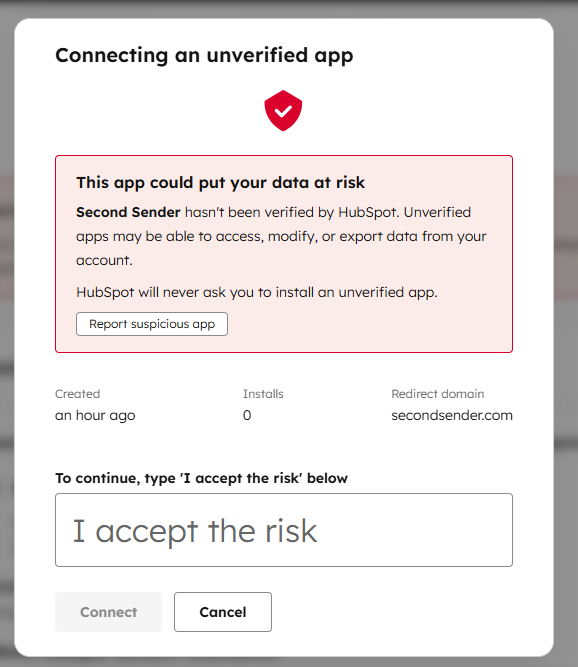
HubSpot will then show a red warning: “This app could put your data at risk.” Because Second Sender is not yet listed in the HubSpot Marketplace, this is expected. Type I accept the risk exactly as shown into the text box, then click Connect to finish.
Second Sender only reads your email data to run optimizations. We never send emails on your behalf without your explicit action inside the app.
Step 1 — Enter Your HubSpot Account Number
Ensure you are currently logged in to HubSpot in another browser tab on this machine.
When you click Install Second Sender, you'll be taken directly to HubSpot to approve the connection — once that's done, you'll be automatically brought back here to launch Second Sender.
Your Account Number is the number shown in the top-right corner of HubSpot after you log in, or in your account URL: app.hubspot.com/contacts/XXXXXXX
Step 2 — Authorize Second Sender
Click Authorize & Install below. You'll be taken to HubSpot to approve the connection. Once you complete the authorization steps there, you'll be automatically brought back to this page to confirm your install.
Second Sender is Connected!
Your HubSpot account has been successfully connected. See Step 2 below to launch Second Sender.
Questions? Email us at beta@secondsender.com — we respond within 24 hours.
Beta Program is Full
We've reached our initial beta capacity and aren't accepting new installs right now. We'll be opening more spots soon.
To be notified when a spot opens, email us at beta@secondsender.com and we'll add you to the waitlist.
Installation Not Completed
It looks like the HubSpot authorization was cancelled or didn't complete. No changes were made to your account.
When you're ready, click below to try again.
Having trouble? Email us at beta@secondsender.com
Step 2 — Launch Second Sender
After a successful install, click the button below to open Second Sender in your HubSpot account.
Beta Program FAQ
Beta testers will be offered the opportunity to continue as paying customers with special beta tier pricing. We'll discuss pricing options that make sense for your team's needs.
Yes. The entire 90-day beta period is completely free. We're investing in beta testers because your feedback helps us build a better product.
During beta, we're focusing on US-based customers to ensure consistent support and feedback. International availability is on our roadmap for post-launch.
Beta testers get dedicated support directly from our team. Email us at beta@secondsender.com and we'll respond within 24 hours.
Yes! Once you're accepted, your entire team can access Second Sender during the 90-day period. We just ask that one person be the main point of contact.
That's exactly what we want! Email us at beta@secondsender.com with any feedback, bugs, or feature requests. Your input directly shapes the product.